
Your National Identification Number (NIN) is the most essential ID number to a Nigerian citizen. The NIN is a requirement for almost everything you do as a Nigerian from opening a bank account, registering a SIM, purchasing properties and even taking public examinations.
Suppose you have an emergency and need it urgently but do not have the slip with you. It could be lost, left at home, or in a shoebox somewhere else (you get the point). Just take it easy.
The National Identity Management Commission (NIMC) has created a simple USSD code that allows you to retrieve your NIN directly from your phone in under a minute.
This guide contains information on everything you need to know about the NIN retrieval code, the universal code, and the MTN, Glo, Airtel and 9mobile network specific retrieval codes.
Also see: FRSC Plate Number Verification in Nigeria: Complete 2026 Guide
What is the NIN Code?
The NIN code is a short USSD (Unstructured Supplementary Service Data) code, which enables the citizens and residents of Nigeria to retrieve their National Identification Number on their mobile phones.
The primary universal code for NIN retrieval is *346#. This code is valid across all networks in Nigeria, which includes MTN, Glo, Airtel, and 9mobile. Upon dialing this code, and answering a few prompts, your NIN will be displayed on your phone.
Is the NIN Code Free?
The NIN retrieval service via *346# is not completely free. There is a nominal service charge of about ₦20 for each successful retrieval, which is deducted from your phone’s existing airtime.
The Universal NIN Code: *346# (Works on All Networks)
The simplest and fastest way to check your NIN is by using the universal USSD code *346# . This code works on MTN, Glo, Airtel, and 9mobile without exception .
Step-by-Step Guide to Using *346#
Follow these simple steps to retrieve your NIN:
| Step | Action | Details |
| Step 1 | Dial *346# | Use the phone number that is already linked to your NIN (the number you registered with NIMC) |
| Step 2 | Select “NIN Retrieval” | A menu will appear. Press 1 to select the NIN Retrieval option |
| Step 3 | Confirm the fee | A message will appear informing you of the ₦20 service fee. Press 1 again to confirm and continue |
| Step 4 | View your NIN | Your 11-digit National Identification Number will be displayed on your screen immediately |
Important: Once your NIN appears on the screen, copy it down immediately or take a screenshot, as the display may time out after a few seconds.
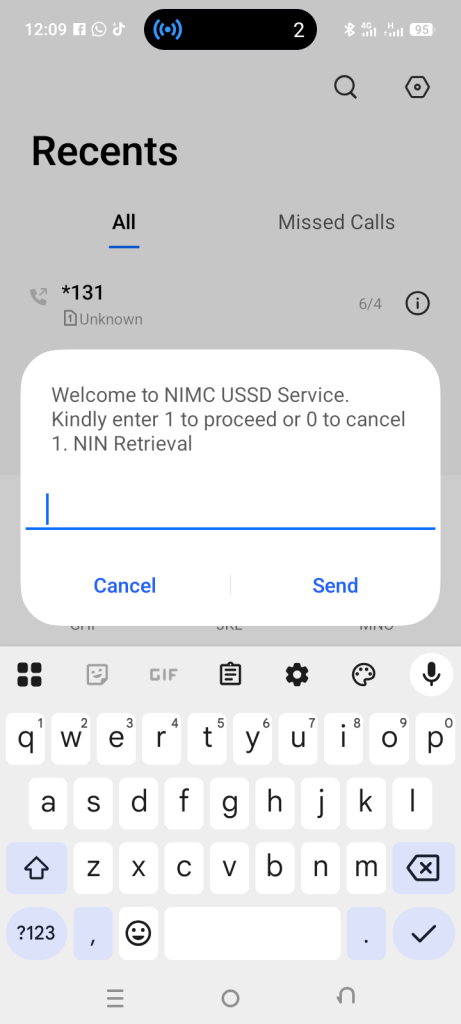
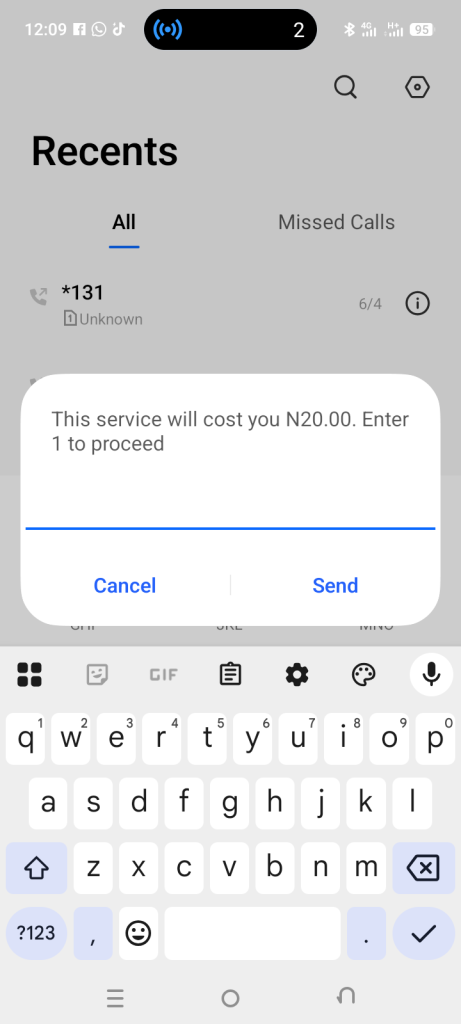
Why Isn’t *346# Working for Me?
If you dial *346# and receive an error message or your NIN is not displayed, here are possible reasons:
| Issue | Solution |
| Wrong phone number | You must use the exact phone number you registered with NIMC when you enrolled for your NIN |
| Network issues | Try dialing again or switch to a different location with better network coverage |
| Insufficient airtime | Ensure you have at least ₦20 credit on your line |
| NIN not yet registered | If you have never enrolled for NIN, you cannot retrieve it via USSD. You must visit a NIMC enrolment centre first |
NIN Code for MTN: Multiple Options
MTN subscribers have several options for checking and managing their NIN. While the universal *346# works perfectly on MTN, there are also MTN-specific codes.
How to Check NIN on MTN
| Method | Code | Instructions |
| Universal Retrieval | *346# | Dial the code, press 1 for NIN Retrieval, confirm fee |
| Alternate Retrieval | *996*3# | Some sources indicate this code also works for NIN retrieval on MTN |
How to Link NIN to MTN SIM
If you already know your NIN and need to link it to your MTN line, use these codes:
| Action | Code |
| Link NIN via USSD | *785# (then follow prompts) |
| Link NIN directly | *785*YourNIN# (e.g., *785*12345678901#) |
| Alternative linking | *996# (then follow prompts) |
Glo Code for NIN Registration & Retrieval
Glo subscribers can retrieve their NIN using the universal *346# code. However, for linking your NIN to your Glo SIM, there is a dedicated Glo code.
How to Check NIN on Glo
Simply dial *346# from your Glo line, press 1, confirm the fee, and your NIN will be displayed .
How to Link NIN to Glo (Glo NIN Code)
| Method | Code / Action | Instructions |
| USSD Direct Link | *109*YourNIN# | Dial exactly as shown. Example: *109*12345678901# |
| SMS Method | Send “UPDATENIN NIN FirstName LastName” to 109 | Example: Send “UPDATENIN 12345678901 John Doe” to 109 |
| Universal Link Code | *996# | Dial and follow prompts |
Example of Glo USSD linking: To link NIN 12345678901 to your Glo line, simply dial *109*12345678901# and press send. You will receive a confirmation message shortly .
NIN Code for Airtel: Retrieval and Linking
Airtel subscribers can also use the universal *346# code to retrieve their NIN. For linking your NIN to your Airtel line, Airtel has its own dedicated code.
How to Check NIN on Airtel
Dial *346# from your Airtel line, select the NIN Retrieval option (press 1), confirm the fee, and your NIN will appear on screen .
How to Link NIN to Airtel (Airtel NIN Code)
| Method | Code / Action | Instructions |
| USSD Link Code | *121*1# | Dial this code, then select option 1 for “NIN Capture” and enter your NIN |
| Universal Link Code | *996# | Dial and follow the prompts to submit your NIN |
What is the code for NIN on Airtel? The direct answer is *121*1# for linking your NIN to your Airtel SIM . For retrieving a forgotten NIN, use *346# .
USSD Code for NIN: Complete Reference Table
Here is a complete reference table for all NIN-related USSD codes across Nigerian networks:
| Purpose | Universal Code | MTN | Glo | Airtel | 9mobile |
| Retrieve NIN | *346# | *346# or *996*3# | *346# | *346# | *346# |
| Link NIN to SIM | *996# | *785# or *785*NIN# | *109*NIN# | *121*1# | Online portal or *996# |
| Service Fee | ₦20 | ₦20 | ₦20 | ₦20 | ₦20 |
Note: The *996# universal linking code works across all networks as an alternative method to submit your NIN to your mobile network provider
What If I Can’t Remember My NIN? (Solutions)
Forgetting your NIN is common, especially since it’s an 11-digit number you may not use every day. Here is what to do if you can’t remember your NIN.
Immediate Solution: Dial *346#
As explained throughout this guide, dialing *346# from your registered phone number is the quickest way to retrieve a forgotten NIN .
Important: Do NOT Re-enrol
NIMC has explicitly stated that you should NOT re-enrol if you forget your NIN. Re-enrolling creates duplicate records and is unnecessary. The NIMC website clarifies: “Do I need to re-enrol if I forget my NIN? No re-enrolment is required”
Conclusion
Your NIN is important to your identity as a Nigerian, and knowing how to retrieve it is important. A method to retrieve it directly to your mobile device, using any of MTN, Glo, Airtel, or 9mobile, is the universal USSD code: *346#. This USSD code is the fastest and most convenient method.
Do not forget to keep at least ₦20 to make the call, and remember to use the number you registered with NIMC. If you have any problems, reach out to a NIMC Enrolment Centre of your choice for help.
YOU MAY ALSO LIKE:
Gender Pay Gap in Nigeria: Statistical Evidence by Occupation (2026): Full Report
Sectoral Salary Rankings: Which Industry Pays the Highest in Nigeria? (Oil & Gas vs. Banking vs. Tech)
Minimum Wage vs. Living Wage in Nigeria: The Statistical Gap (2019–2026)
Average Monthly Salary in Nigeria by State (2026): State-by-State Breakdown
OPay Customer Care: Complete Guide to Reaching Support in Nigeria
FCMB: Your Complete Banking Guide for 2026
FRSC Plate Number Verification in Nigeria: Complete 2026 Guide